

CMMC Level 1
CMMC Level 1 Evidence Examples, Objective by Objective
Real, plain-English evidence examples for the CMMC Level 1 requirements, organized by domain, so you know what proof to keep behind each determination.
Almost everyone doing a Level 1 self-assessment hits the same wall. You understand the requirements, but you cannot find a clear list of what evidence actually satisfies them. The official documents describe the objectives, forum answers say "keep screenshots of everything," and you are left guessing. This guide gives you concrete examples of the proof to keep, organized the way you will actually work.
The short version. CMMC Level 1 has 15 requirements broken into 59 assessment objectives across 6 domains. For each one you make a determination and keep the evidence behind it. Evidence is usually a screenshot, a configuration export, a written policy or procedure, a log, or a photo. A Level 1 assessment is checked three ways, examine, interview, and test, so good evidence shows the safeguard is in place and shows it working.
What Counts as Evidence at Level 1
There is no single government form that lists the exact artifact for every objective, which is why this feels harder than it should. In practice, evidence at Level 1 falls into a few types.
- A screenshot of a setting, a console, or a policy as configured.
- A configuration export or report from a system.
- A written policy or procedure that says how you do something.
- A log or record that shows the safeguard running over time.
- A photo, for the physical objectives.
The assessment objectives come from NIST SP 800-171A, which frames how each is checked using three methods. Examine means look at the artifact. Interview means confirm the person responsible understands it. Test means show it works. You do not need a heavy document set at Level 1. You need proof that each objective is true, and you need to be able to find it again.
Evidence Examples by Domain
Below are practical examples for each of the 15 requirements, grouped by their six domains. Treat them as a starting point for your own environment, not a checklist to copy blindly. Your evidence has to reflect how your company actually operates.
Access Control (19 objectives)
- AC.L1-b.1.i, limit system access to authorized users. A current user list from your identity provider or domain, plus your onboarding and offboarding steps showing how access is granted and removed.
- AC.L1-b.1.ii, limit access to permitted transactions and functions. A screenshot of role or group permissions showing that staff have only the access their job needs.
- AC.L1-b.1.iii, verify and control connections to external systems. Your list of approved external services and a screenshot of how remote or external connections are controlled.
- AC.L1-b.1.iv, control information posted to publicly accessible systems. A short procedure for who can post to your public website or social accounts, plus a review record. If you genuinely have no publicly accessible systems, N/A may apply, but that is a call you make about your own environment.
Identification and Authentication (6 objectives)
- IA.L1-b.1.v, identify system users, processes, and devices. A screenshot showing unique accounts for each person, with no shared logins, and a basic device inventory.
- IA.L1-b.1.vi, authenticate users before granting access. Your authentication settings, such as your password policy, shown as configured. Multifactor authentication is not required at Level 1, though it is fine to show if you already use it.
Media Protection (2 objectives)
- MP.L1-b.1.vii, sanitize or destroy media before disposal or reuse. Your media disposal procedure and a record of drives wiped or destroyed, or a certificate from a disposal vendor.
Physical Protection (10 objectives)
- PE.L1-b.1.viii, limit physical access to systems and equipment. A photo of your locked server area or network closet, and a note of who holds keys or badge access.
- PE.L1-b.1.ix, escort visitors, log physical access, and manage devices. A visitor log and your visitor procedure, plus how you track physical devices.
System and Communications Protection (10 objectives)
- SC.L1-b.1.x, monitor and control communications at the boundary. Your firewall configuration or a screenshot of boundary rules on your router or cloud network.
- SC.L1-b.1.xi, separate publicly accessible systems from internal networks. A simple network diagram showing your public-facing systems separated from your internal network, for example a guest network split from your internal one.
System and Information Integrity (12 objectives)
- SI.L1-b.1.xii, identify, report, and correct system flaws. Your patching approach and a screenshot of update status across your systems.
- SI.L1-b.1.xiii, protect against malicious code. Your antivirus or endpoint protection console showing coverage across devices.
- SI.L1-b.1.xiv, keep malicious code protection current. A screenshot of definition or engine update status, showing it is current.
- SI.L1-b.1.xv, perform periodic and real-time scans. Your scan configuration and a recent scan result.
Where to Keep It, and for How Long
Collecting the evidence is half the job. The other half is keeping it in a way you can defend a year or two from now. You are required to retain your Level 1 assessment and its evidence for six years under 32 CFR 170.15.
This is where the improvised methods break down. A folder per requirement, a Teams channel, an Excel workbook with a tab per objective, screenshots in a binder. They all work until someone leaves, a laptop is replaced, or next year's affirmation comes due and no one can find the file that backed a determination. The evidence has to be tied to the objective it proves and held somewhere it will still be there in six years.
One Home for Every Artifact
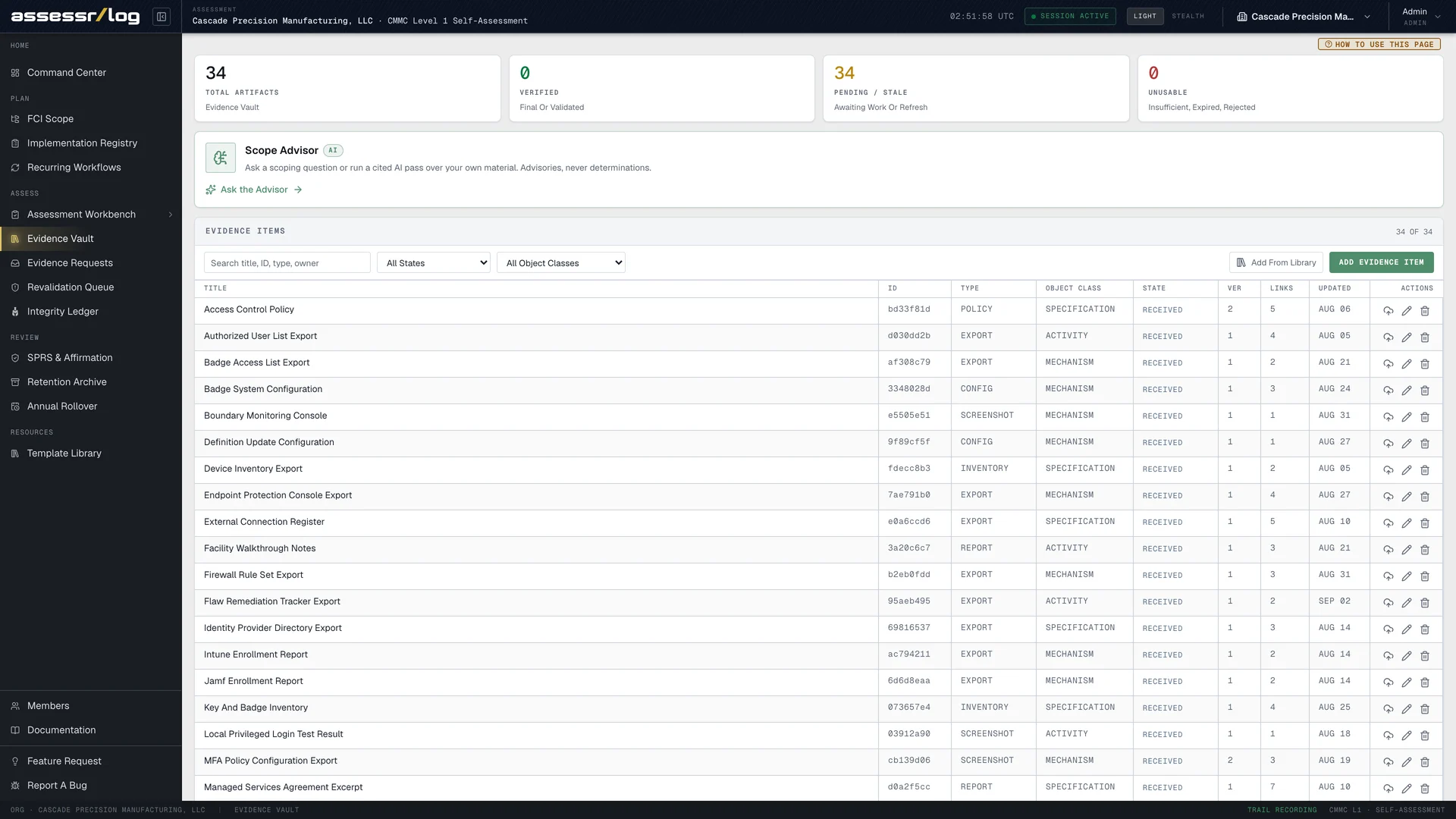
AssessrLog is the system of record for exactly this. Each determination lives beside the evidence that backs it, uploaded and held in one protected place rather than scattered across devices and drives. You can see what is proven, what still needs an artifact, and the history behind each call. The uploaded evidence is versioned and content-hashed, and how it is protected is covered on our security page.
When you are ready, you hand your affirming official a package where your determinations and the evidence behind them sit together, ready to defend a year or two from now.
Frequently Asked Questions
Is there an official list of Level 1 evidence for every objective? There is no single government form that names one exact artifact per objective. The examples above are practical starting points. Your evidence must reflect your own environment.
Does my evidence have to be a formal document? No. Most Level 1 evidence is screenshots, configuration exports, short procedures, logs, or photos. What matters is that it shows the objective is true.
How long do I keep the evidence? Six years, under 32 CFR 170.15, along with the assessment itself.
Can an objective be marked N/A? Yes, when it genuinely does not apply to your environment. N/A is one of the three valid determinations, alongside MET and NOT MET. Keep a short note of why it does not apply.
Should evidence live inside my system security plan? Keep the proof organized and findable, tied to each objective. A Level 1 self-assessment does not require a heavy document set, and mixing everything into one file makes it harder to defend later.